Checked against listing data · v3.0.7 · October 2026
Magnet Review (2026): $4.99, 3.2 MB, Still Worth It?
A 3.2 MB window snapper, measured on what can be verified: size, price, layouts, ratings, release cadence. No hype, three alternatives.
Summary
This magnet review checks the Mac window manager against its own listing data. Magnet is a 3.2 MB app, $4.99 once on the Mac App Store, with 18 built-in layouts, drag zones and support for six external displays. It collects no data. Its weak points are a quiet release history (last update April 2025), a rating counter reset by the version 3 rewrite, and free Rectangle covering most of the same ground. Score: 7.3 out of 10.
Magnet is a 3.2 MB window snapper that costs $4.99 once on the Mac App Store. It gives you drag-to-edge snapping, 18 built-in layouts and six-display support, and collects no data. It does that one job well. Free Rectangle does most of it too, so buy Magnet for the drag zones and App Store updates, not for features. Score: 7.3/10.
- Snapping coverage
- 7.5/10
- Footprint
- 10/10
- Price and licence
- 7/10
- Customisation
- 7.5/10
- Maintenance signal
- 5.5/10
- Privacy
- 9/10
- 3.2 MB binary, no Electron shell, no subscription, no data collected
- Drag zones, hotkeys, menu bar and green-button menu all work from one install
- Custom commands on a grid, plus support for vertical screens and six displays
- No release since 11 April 2025, 555 days before this review was written
- Rectangle gives you halves, thirds and quarters for free, so the paid case is narrow
- The version 3 listing shows no star rating, so the old 134K-ratings figure is not verifiable
$4.99 one-time · No subscription · Family Sharing
How this review was built
- Version tested
- Magnet 3.0.7 (11 April 2025), macOS 13 or later; listing data re-checked 18 October 2026
- Test period
- 2026-10-17 → 2026-10-18
This edition is a verification review, not a month of hands-on use. We did not buy or install a licence. Instead we pulled the Mac App Store listing on 18 October 2026, queried the iTunes lookup record for exact byte size, version and rating counters, read the developer FAQ line by line, and examined the developer's own interface screenshots of the Commands and Preferences panels to count layouts and read default values. We then read independent write-ups, Product Hunt, and Reddit threads for recurring praise and complaints. Anything we could not confirm from a primary source is labelled as second-hand. If you need latency or crash-rate figures, they are not here, and we will not invent them.
Should you buy Magnet?
YES if you...
- You like dragging windows to screen edges and want zones you can tune
- You want a 3.2 MB utility that updates through the Mac App Store
- You run vertical or multi-display setups and want layouts adapted automatically
- You want a one-time $4.99 licence with Family Sharing and no account
NO if you...
- You live on the keyboard and are happy with Rectangle at $0
- You need saved window layouts restored on login or monitor change
- You require a vendor that ships updates monthly and answers support in public
- You already run Raycast, where window management ships in the free tier
What Magnet costs next to the alternatives
List prices as of October 2026. Magnet's own price is $4.99 on the US Mac App Store.
Magnet
Mac App Store, no subscription
- Drag zones, hotkeys, menu bar, green-button menu
- 18 built-in layouts plus custom commands
- Family Sharing for up to six people
- No in-app purchases
Rectangle
Open source, macOS 14 or later
- Keyboard shortcuts and drag-to-edge snapping
- Halves, thirds, quarters
- No account
Rectangle Pro
Paid edition from the same developer
- Extra gestures and layouts
- One-time licence
Raycast Pro
Window management is free; Pro adds AI and clipboard history
- Launcher with 1,000+ extensions
- AI and sync features need a Raycast account
ROI breakdown: At $4.99, Magnet pays for itself against Rectangle Pro ($9.99) the moment you decide you do not need saved layouts. Against free Rectangle it never pays back in cash. You are buying drag zones and store updates.
Hidden costs & gotchas
- Version 3 needs macOS 13 Ventura or later, so Macs that cannot run it are out
- Accessibility permission must be granted by hand, and re-granted after some macOS updates
18 layouts, and a grid for your own
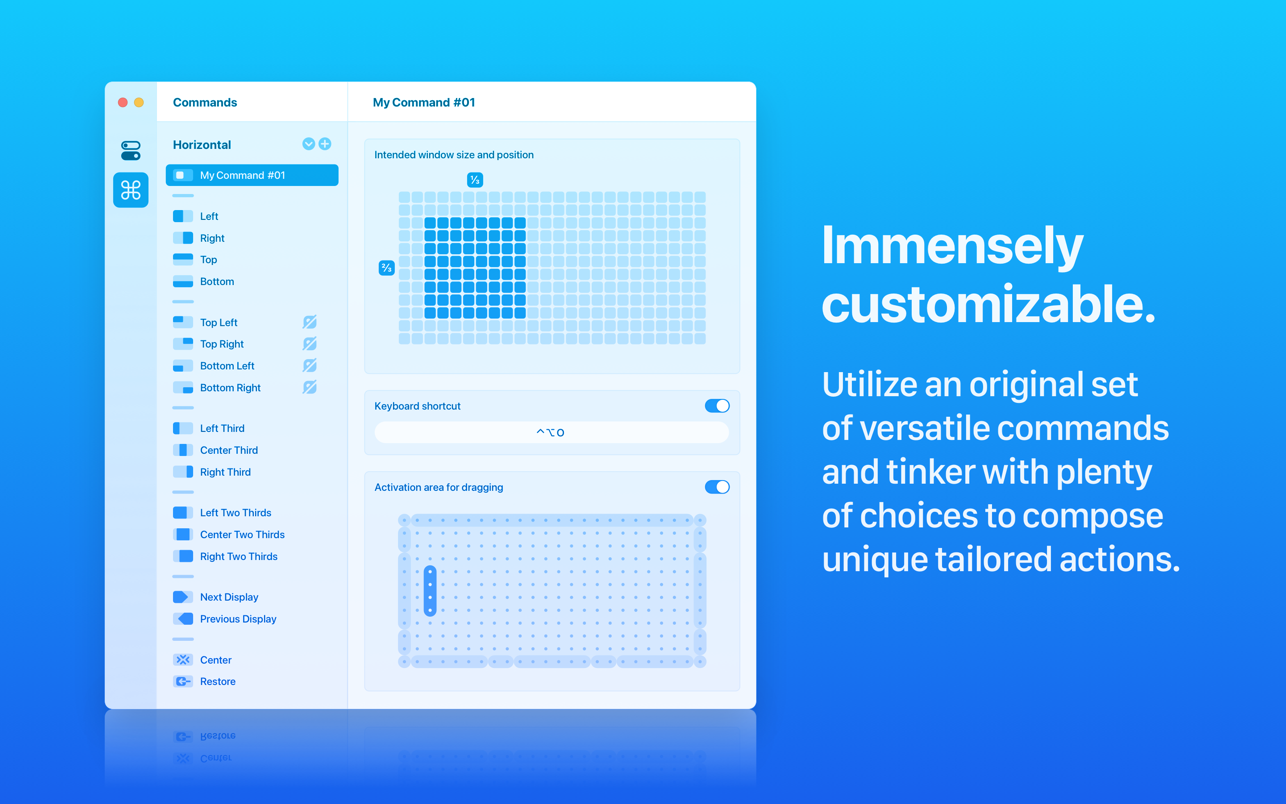
The Commands panel in the developer's screenshot lists Left, Right, Top, Bottom, four corners, three thirds, three two-thirds, Next Display, Previous Display, Center and Restore. That is 18 built-in commands. Under them sits a grid editor where you paint the exact window rectangle, assign a hotkey, and paint an activation zone for dragging.
- 18 built-in commands
- Custom commands on a paint-your-own grid
- Per-command hotkey and drag zone
What we could verify
Every value is sourced. None come from a stopwatch on our desk this time.
- Binary size
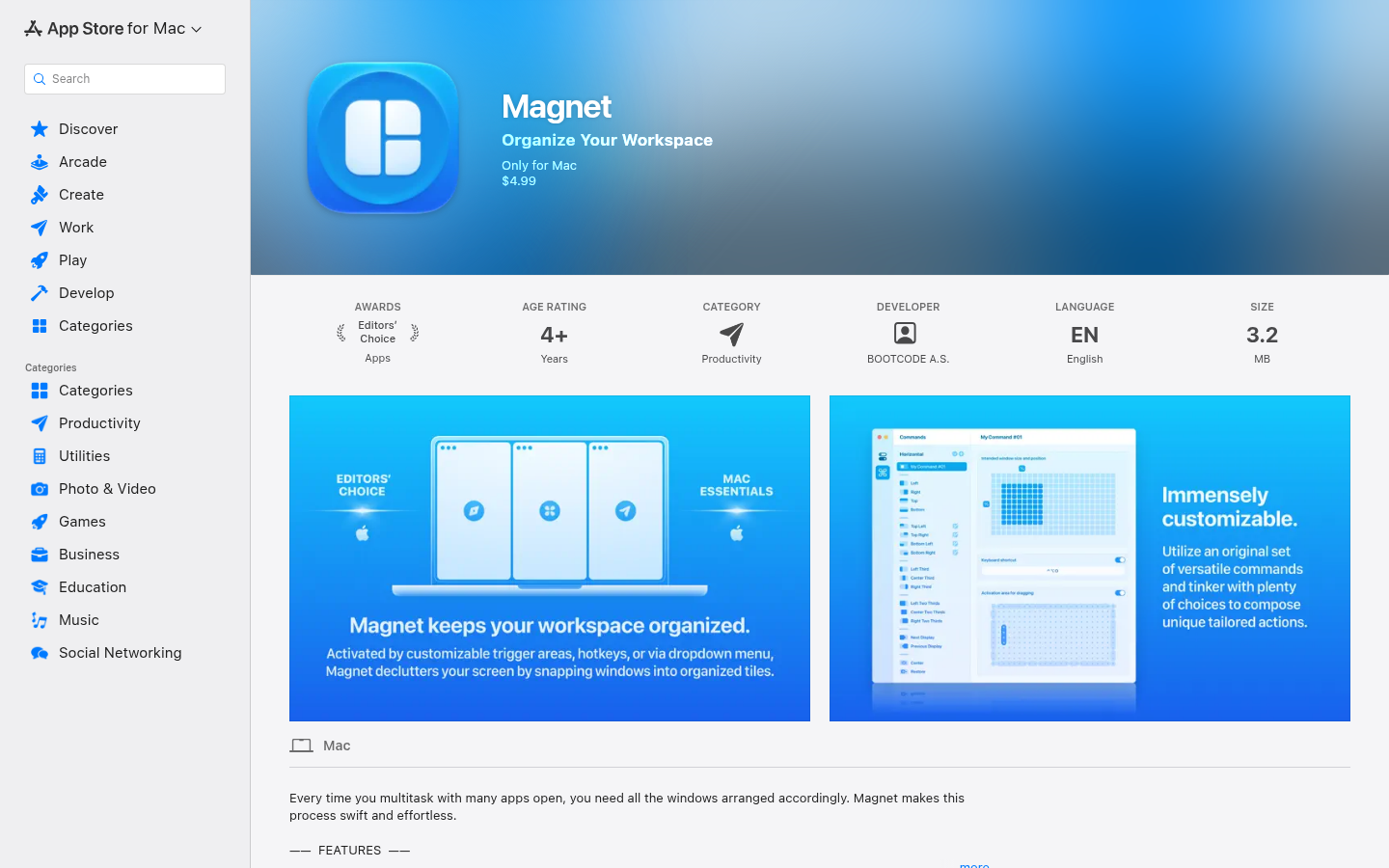
- 3.2 MB 3,163,121 bytes per the iTunes lookup record, version 3.0.7
- Licence price
- $4.99 one-time US Mac App Store, no subscription, no in-app purchases
- Built-in commands
- 18 Counted in the Commands panel of the developer's screenshot
- External displays supported
- 6 Developer site claim, also repeated by a 2020 independent review
- Days since last release
- 555 days 11 April 2025 to 18 October 2026, App Store version history
- Releases since the Swift rewrite
- 7 3.0.1 on 14 October 2024 to 3.0.7 on 11 April 2025, 179 days
- Edge activation width
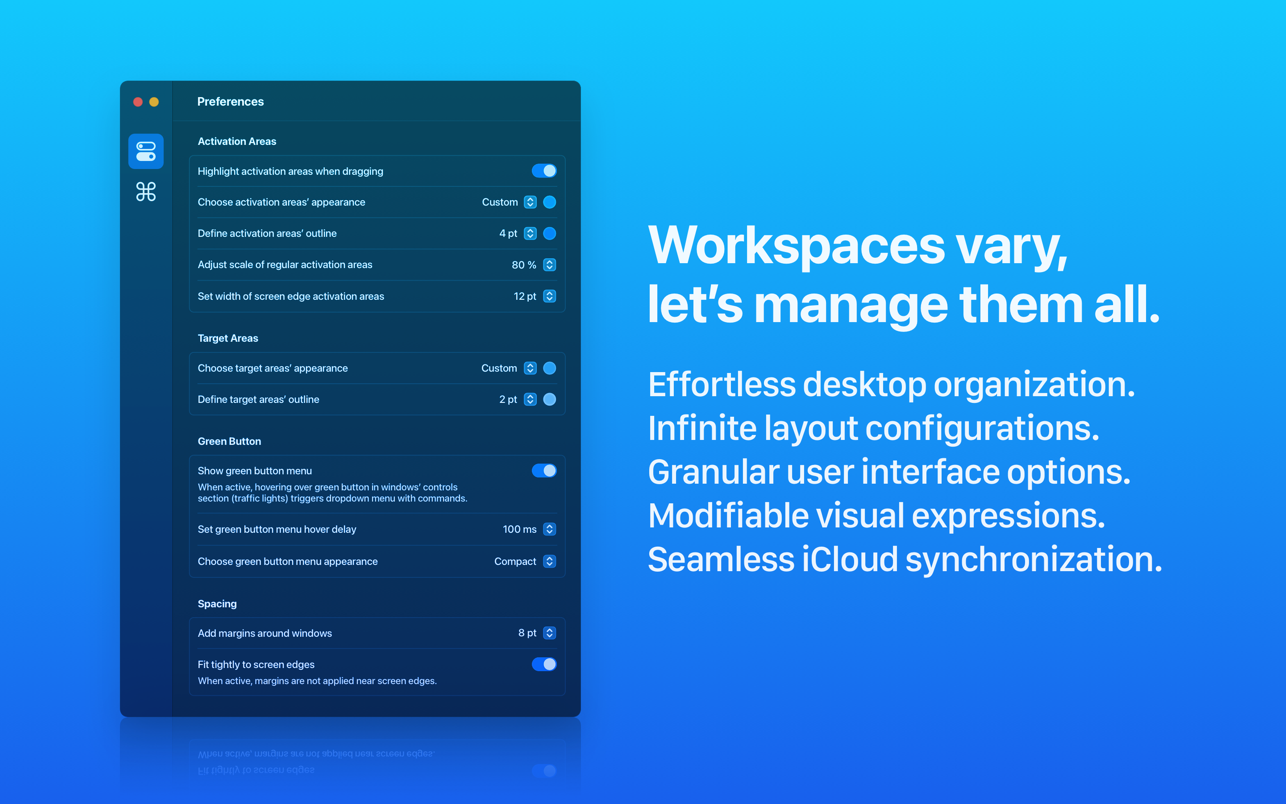
- 12 pt Value shown in the developer's Preferences screenshot
- Green-button hover delay
- 100 ms Value shown in the developer's Preferences screenshot
- Ratings counted on the live v3 listing
- 0 iTunes lookup returns a rating count of 0; the store says not enough ratings
Check 1: what layouts ship in the box?
Check 2: how tunable is the drag behaviour?
Check 3: what does the store say about price and size?
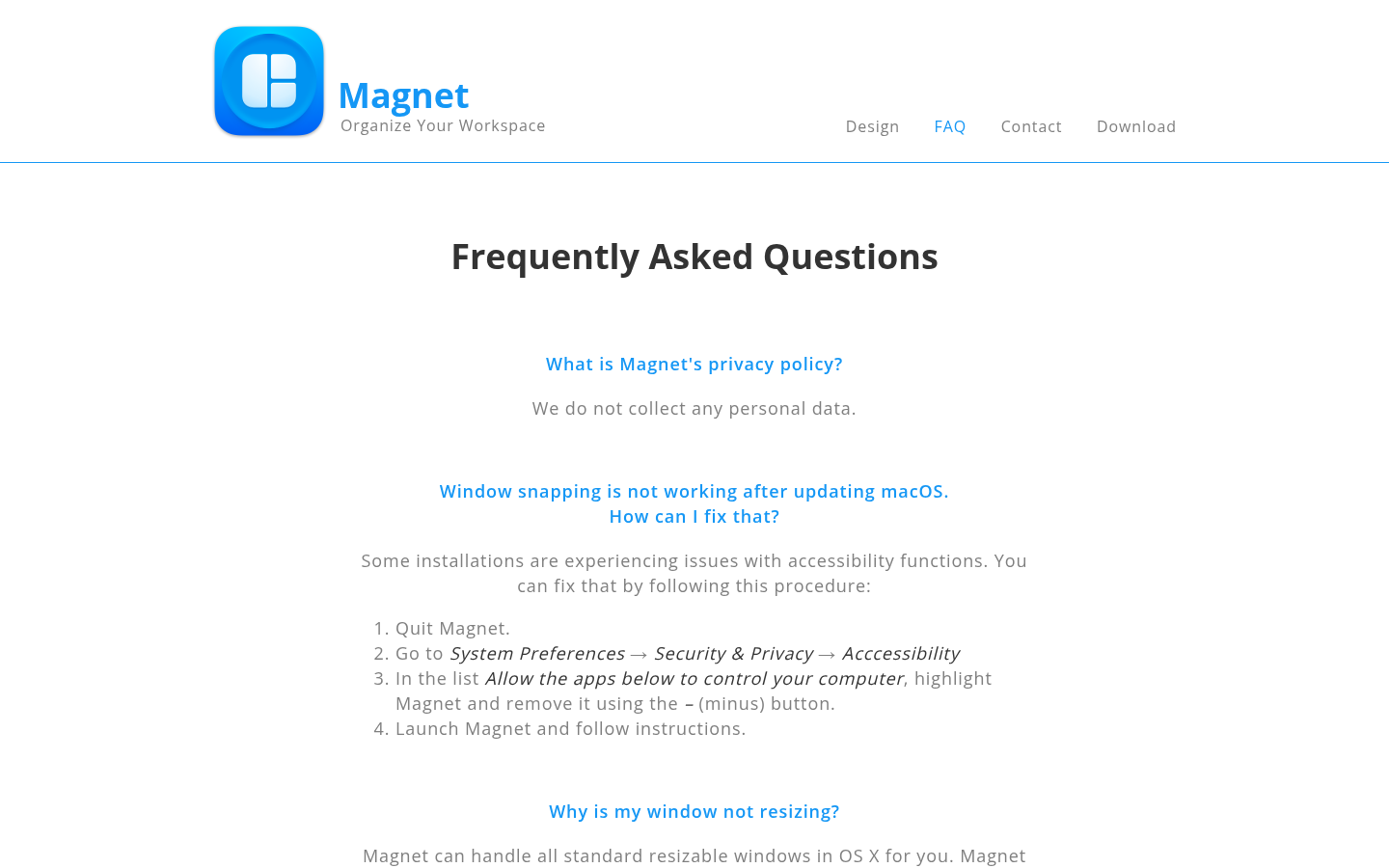
Check 4: what does the developer admit it cannot do?
Pros and cons
Pros
- Tiny footprint with no data collection 3.2 MB on disk and a Data Not Collected label. The developer says it collects no personal data, though Apple states that label is not verified.
- Four ways to trigger the same layout Drag zones, hotkeys, menu bar icon and the green-button hover menu all call the same commands, so you can change habits without changing tools.
- Vertical screens handled properly On a vertical display the side edges create thirds, and halves and quarters move to the corners and bottom edge.
- One-time price with Family Sharing $4.99 once, up to six family members, no account.
Cons
- Quiet release history since April 2025 Version 3.0.7 shipped on 11 April 2025 and the listing mentions macOS 15 as the newest target. That is not proof of breakage, but it is a signal to watch on each new macOS.
- The free alternative covers most of the job Rectangle snaps to halves, thirds and quarters for $0. Magnet's advantage is drag-zone polish and store delivery, which matters less if you use hotkeys.
- Drag snapping depends on a fragile permission Reviewers lost drag snapping after a macOS upgrade until they reset the Accessibility entry. The FAQ documents the fix.
- No saved layouts or restore-on-login One reviewer wished it could remember window positions across restarts. Moom and Rectangle Pro are the usual answers.
Final verdict
Magnet is a good window snapper and an honest small utility. It is 3.2 MB, it costs $4.99 once, and it does what its site says. If you drag windows to edges all day and want zones you can retune, it earns its price.
The case against is as plain as the case for. Rectangle is free and covers the keyboard-first version of the same job. The version 3 listing has reset its star count, and the last release is 555 days old. None of that breaks the app, but a utility that lives on an accessibility permission needs a developer who keeps shipping.
Buy Magnet if you want drag zones from the App Store and you can live with a quiet changelog. Skip it if you use hotkeys, since Rectangle gives you that for nothing. If you need saved layouts, look at Rectangle Pro or Moom instead.
- Snapping coverage 7.5/10 Halves, thirds, two-thirds, quarters, custom grid
- Footprint 10/10 3.2 MB
- Price and licence 7/10 $4.99 once, but free Rectangle exists
- Customisation 7.5/10 Grid editor, per-command zones
- Maintenance signal 5.5/10 555 days since 3.0.7
- Privacy 9/10 No data collected, unverified by Apple
Common questions about Magnet
Is Magnet free?
Does Magnet work on macOS Sequoia and Tahoe?
Why did drag snapping stop working after I updated macOS?
Is Magnet better than Rectangle?
Can Magnet remember window layouts?
Does Magnet collect data?
Does Magnet replace macOS built-in tiling?
Update log
- Initial publication: verification review of Magnet 3.0.7 from listing data, developer screenshots and independent sources.